Welcome to JDrupes Builder
JDrupes Builder (“jdbld” for short) is a build automation tool that uses Java for its configuration and centers around resources.
Here’s the source code for a sample build configuration, which will be explained in more detail below:
public class SimpleApp extends AbstractProject implements RootProject {

    public SimpleApp() {
        super(name("simple-app"));
        generator(JavaCompiler::new).addSources(Path.of("src"), "**/*.java");
        generator(UberJarGenerator::new).from(providers(Supply))
            .mainClass("jdbld.demo.simpleapp.App");

        // Command arguments
        commandAlias("build", requestFor(AppJarFile.class));
    }
}
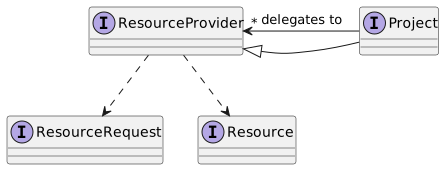
In jdbld’s terminology, a build system is a provider of resources. It is implemented as a graph of ResourceProviders, which provide Resources in response to ResourceRequests. The topmost layer of the build system’s configuration is a collection of classes that implement the special resource provider Project. Projects provide resources by requesting them from other ResourceProviders.
Single project builds
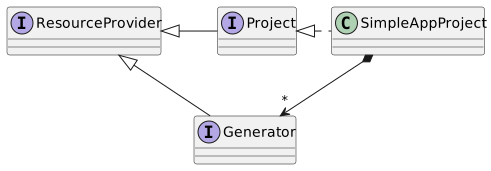
In a single project build configuration, an instance of the defined project class provides all resources by requesting them from its Generators, which are another special kind of ResourceProviders.
A build configuration (a.k.a project) for a simple Java application is shown below. It illustrates the objects generated by the source code of the aforementioned sample build configuration.
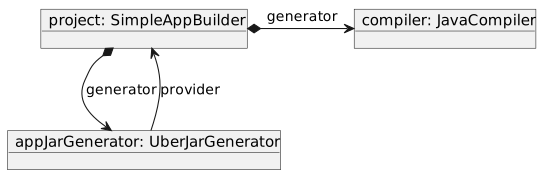
The project uses two generators. The first is a JavaCompiler, which provides resources of type ClassTree to the project.
generator(JavaCompiler::new).addSources(Path.of("src"), "**/*.java");
The second generator is an UberJarGenerator.
        generator(UberJarGenerator::new).from(providers(Supply))
            .mainClass("jdbld.demo.simpleapp.App");
This generator can provide resources of type AppJarFile. Instantiated as shown above, it uses the ClasspathElements generated by the project as input for the jar’s contents.
You might wonder why the app jar generator goes back to the project to retrieve the classpath elements. Looking at the API, we could also configure the app jar generator to use the classpath elements from the Java compiler directly. There are two reasons for this. First, a user might want to request the class tree from the project which would not be possible if the resources provided by the Java compiler were used as input to the app jar generator only. The second reason will become apparent when we discuss a multi-project build configuration, in which a project can provide resources from another project in addition to those obtained from its generators.
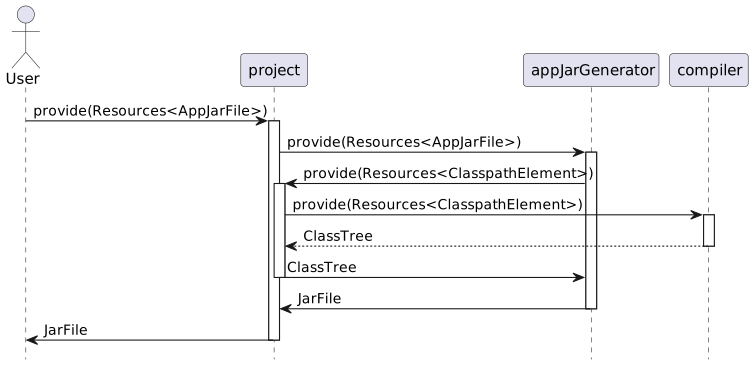
For further clarification, the diagram below shows the sequence of operations as they happen when a user requests the application jar from the project.